
Overview
The BREAK statement is a control of flow statement that is used to exit a loop immediately and skip the rest of the code within the loop.

Examples
Here is an example of using the BREAK statement in a WHILE loop:
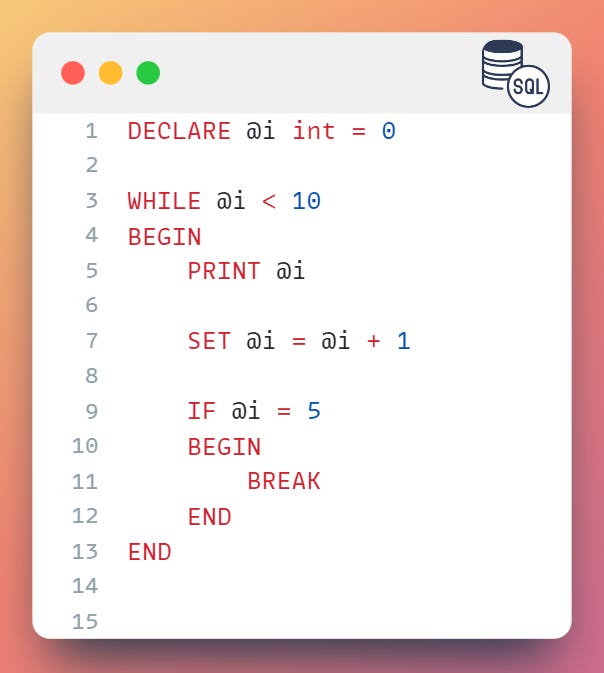
In this example, we declared a variable
@iand set it to 0.Then, we used the
WHILEloop to iterate through the loop as long as@iis less than 10.Within the loop, we printed the value of
@iand incremented it by 1. Finally, we used theBREAKstatement to exit the loop when@iequals 5.
Advantages and Disadvantages
There are several advantages to using the BREAK statement:
The BREAK statement allows you to exit a loop immediately and skip the rest of the code within the loop.
The BREAK statement can be used to exit a loop when a certain condition is met, which can improve the efficiency of the loop.
However, there are also some disadvantages to using the BREAK statement:
The BREAK statement can make the code more difficult to read and understand, as it can disrupt the natural flow of the code.
The BREAK statement can make the code more prone to errors, as it can be easy to forget to include a condition to exit the loop.
Use Cases
There are several use cases for the BREAK statement:
Terminating a loop early when a certain condition is met
Exiting a loop when an error occurs
Exiting a loop when a user-defined exit condition is met
Here is an example of using the BREAK statement to exit a loop early:
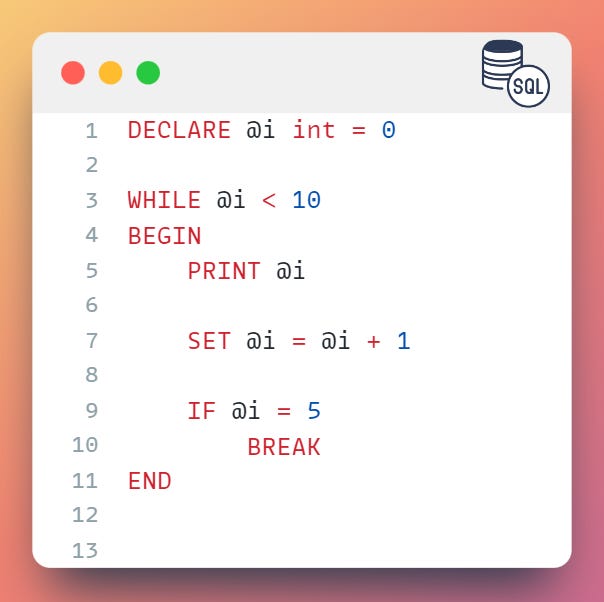
In this example, we declared a variable
@iand initialized it to 0.Then, we used the
WHILEloop to iterate through the loop until the value of@iis less than 10.Inside the loop, we printed the value of
@iand incremented it by 1.Then, we used the
IFstatement to check if the value of@iis equal to 5.If the condition is true, the
BREAKstatement is executed and the loop is terminated.

Best Practices
When using the BREAK statement, it is important to keep the following best practices in mind:
Use the BREAK statement sparingly, as it can disrupt the natural flow of the code and make it more difficult to read and understand.
Use the BREAK statement only when necessary, as it can impact the performance of the code.
Make sure to include a condition to exit the loop, as it can be easy to forget to include a BREAK statement.

Summary
The BREAK statement is a useful tool for exiting a loop early when a certain condition is met.
It is important to use the BREAK statement sparingly and only when necessary to ensure optimal performance and maintainability of the code.